Configure Backups and Restore
Schedule automatic backups and restore from snapshots for your databases
Backups protect your data against accidental deletion, corruption, and disasters. Hostess supports scheduled automatic backups for PostgreSQL, Redis, and custom services, with simple CLI commands for manual backups and restores.
Quick Start
Add a single line to your database service to enable daily backups:
services:
  database:
    type: postgres
    resources: medium
    backups: daily
That's it. Hostess automatically takes a backup every day and retains the last 7 backups.
Backup Configuration
Shorthand form
The simplest way to enable backups for PostgreSQL and Redis services:
services:
  database:
    type: postgres
    resources: medium
    backups: daily
This uses sensible defaults:
- Schedule: Daily
- Retention: 7 backups
Full form
For more control over schedule and retention:
services:
  database:
    type: postgres
    resources:
      preset: large
      storage: 50Gi
    backups:
      schedule: daily
      retention: 14
Configuration reference
| Field | Type | Required | Default | Description |
|---|---|---|---|---|
schedule | string | Yes | - | How often to run backups |
retention | number | No | 7 | Number of backups to keep (1-365) |
command | string[] | Custom only | - | Backup command (required for custom type services) |
restore_command | string[] | No | - | Restore command (for custom type services) |
Schedule Options
Hostess supports named schedules and custom cron expressions:
| Schedule | Frequency | Runs At |
|---|---|---|
daily | Once per day | 2:00 AM UTC |
weekly | Once per week | Sunday 2:00 AM UTC |
biweekly | Weekly in Hostess v1 | Sunday 2:00 AM UTC |
monthly | Once per month | 1st of month 2:00 AM UTC |
| Cron expression | Custom | Per your expression |
The biweekly preset resolves to the same weekly schedule as weekly. Use a custom cron expression for an every-two-weeks cadence.
Named schedules
# Daily backups
backups: daily

# Weekly backups
backups:
  schedule: weekly
  retention: 4

# Monthly backups with long retention
backups:
  schedule: monthly
  retention: 12
Custom cron expressions
For precise scheduling, use a standard 5-field cron expression:
# Every 6 hours
backups:
  schedule: "0 */6 * * *"
  retention: 28

# Every day at 4:30 AM UTC
backups:
  schedule: "30 4 * * *"
  retention: 14

# Every Monday and Thursday at midnight
backups:
  schedule: "0 0 * * 1,4"
  retention: 8
Cron expression format: minute hour day-of-month month day-of-week
| Field | Values |
|---|---|
| Minute | 0-59 |
| Hour | 0-23 |
| Day of month | 1-31 |
| Month | 1-12 |
| Day of week | 0-6 (Sunday = 0) |
Retention
The retention field controls how many backups Hostess keeps. When a new backup is created and the count exceeds the retention limit, the oldest backup is automatically deleted.
backups:
  schedule: daily
retention: 30 # Keep 30 days of daily backups| Retention | Schedule | Effective Coverage |
|---|---|---|
7 | daily | 1 week of backups |
14 | daily | 2 weeks of backups |
30 | daily | 1 month of backups |
4 | weekly | 1 month of backups |
12 | monthly | 1 year of backups |
The maximum retention is 365 backups. The minimum is 1.
Supported Services
PostgreSQL
Hostess uses native PostgreSQL backup tools (pg_dump) for reliable, consistent backups:
services:
  database:
    type: postgres
    resources:
      preset: large
      storage: 100Gi
    backups:
      schedule: daily
      retention: 14
No custom commands needed — Hostess handles the backup and restore process automatically.
Redis
Hostess uses Redis snapshot mechanisms for backups:
services:
  cache:
    type: redis
    resources: medium
    backups:
      schedule: daily
      retention: 7
Custom services
For custom services (MongoDB, Elasticsearch, or any service with its own backup mechanism), provide explicit backup and restore commands:
services:
  mongodb:
    type: custom
    image: mongo:7
    ports: [27017]
    resources:
      preset: large
      storage: 50Gi
    backups:
      schedule: daily
      retention: 7
      command: ["mongodump", "--archive=/backup/dump.gz", "--gzip"]
      restore_command: ["mongorestore", "--drop", "--archive=/backup/dump.gz", "--gzip"]
Important requirements for custom backup commands:
- The backup
commandmust write output to the/backup/directory. Hostess manages this directory and uses it to store and retrieve backup files. - The
restore_commandreads from the same/backup/directory. - If you omit
restore_command, automated restore via the CLI is disabled — you would need to restore manually.
The command and restore_command fields are only allowed on custom type services. PostgreSQL and Redis services use built-in backup methods and do not accept custom commands.
More custom backup examples
Elasticsearch:
services:
  search:
    type: custom
    image: elasticsearch:8.12.0
    ports: [9200]
    resources: large
    backups:
      schedule: weekly
      retention: 4
      command: ["sh", "-c", "elasticdump --input=http://localhost:9200 --output=/backup/dump.json"]
      restore_command: ["sh", "-c", "elasticdump --input=/backup/dump.json --output=http://localhost:9200"]
SQLite (file-based):
services:
  app:
    type: custom
    build:
      source: .
    backups:
      schedule: daily
      retention: 14
      command: ["cp", "/data/app.db", "/backup/app.db"]
      restore_command: ["cp", "/backup/app.db", "/data/app.db"]
Manual Backups
In addition to scheduled backups, you can create a backup at any time using the CLI:
Create a manual backup
hostess backups create database✓ Backup job created for database
Job: database-backup-manual-a1b2c3d4The command starts a backup job. Use hostess backups list --service database after the job finishes to see the backup file. Manual backups count toward your retention limit; when the backup count exceeds the limit, the backup script removes the oldest files.
List backups
View all available backups for a service:
hostess backups list --service databaseSERVICE DATE SIZE TYPE FILE
──────────────────────────────────────────────────────────────────────────────────────────
database 2026-03-27 14:23:45 142 MB manual database-20260327-142345.sql.gz
database 2026-03-27 02:00:00 141 MB scheduled database-20260327-020000.sql.gz
database 2026-03-26 02:00:00 140 MB scheduled database-20260326-020000.sql.gzRestoring from a Backup
List available backups
hostess backups list --service databaseNote the backup filename you want to restore from.
Restore the backup
hostess backups restore database --backup database-20260327-020000.sql.gzThis will overwrite the current database. Continue?
Type 'yes' to confirm: yes
✓ Restore job created for database
Restore job: database-restore-e5f6g7h8
Safety backup job: database-backup-pre-restore-a1b2c3d4Restoring replaces all current data. The existing database contents are completely overwritten with the backup data. This operation cannot be undone. Consider testing the restore on a preview environment first.
Hostess creates a safety backup before launching the restore job. The CLI prints both job names; inspect deployment jobs or run hostess backups list --service database after completion to confirm the resulting backup files.
Safe restore workflow
Before restoring in production, test the backup on a preview environment:
Create a preview environment
Open a PR or deploy to a staging environment with the same database configuration.
Restore the backup to the preview
hostess backups restore database --backup database-20260327-020000.sql.gz --env stagingVerify the data
Connect to the preview database and verify the data is correct:
hostess connect database --env stagingRestore to production
Once you've verified the backup is good, restore it to production:
hostess backups restore database --backup database-20260327-020000.sql.gzComplete Example
A full-stack application with backup configurations for all data services:
version: "1.0"
name: My App

services:
  database:
    type: postgres
    resources:
      preset: large
      storage: 100Gi
    retention: permanent
    backups:
      schedule: daily
      retention: 30

  cache:
    type: redis
    resources: medium
    backups:
      schedule: daily
      retention: 7

  api:
    type: fastapi
    build:
      source: ./backend
    depends_on:
      - database
      - cache
    env:
      DATABASE_URL: ${database.url}
      REDIS_URL: ${cache.url}
    replicas:
      min: 2
      max: 10
      target_cpu: 70
    resources: medium
    lifecycle:
      migrate:
        command: ["alembic", "upgrade", "head"]

  frontend:
    type: nextjs
    build:
      source: ./frontend
    depends_on:
      - api
    env:
      NEXT_PUBLIC_API_URL: ${api.external_url}
    resources: small
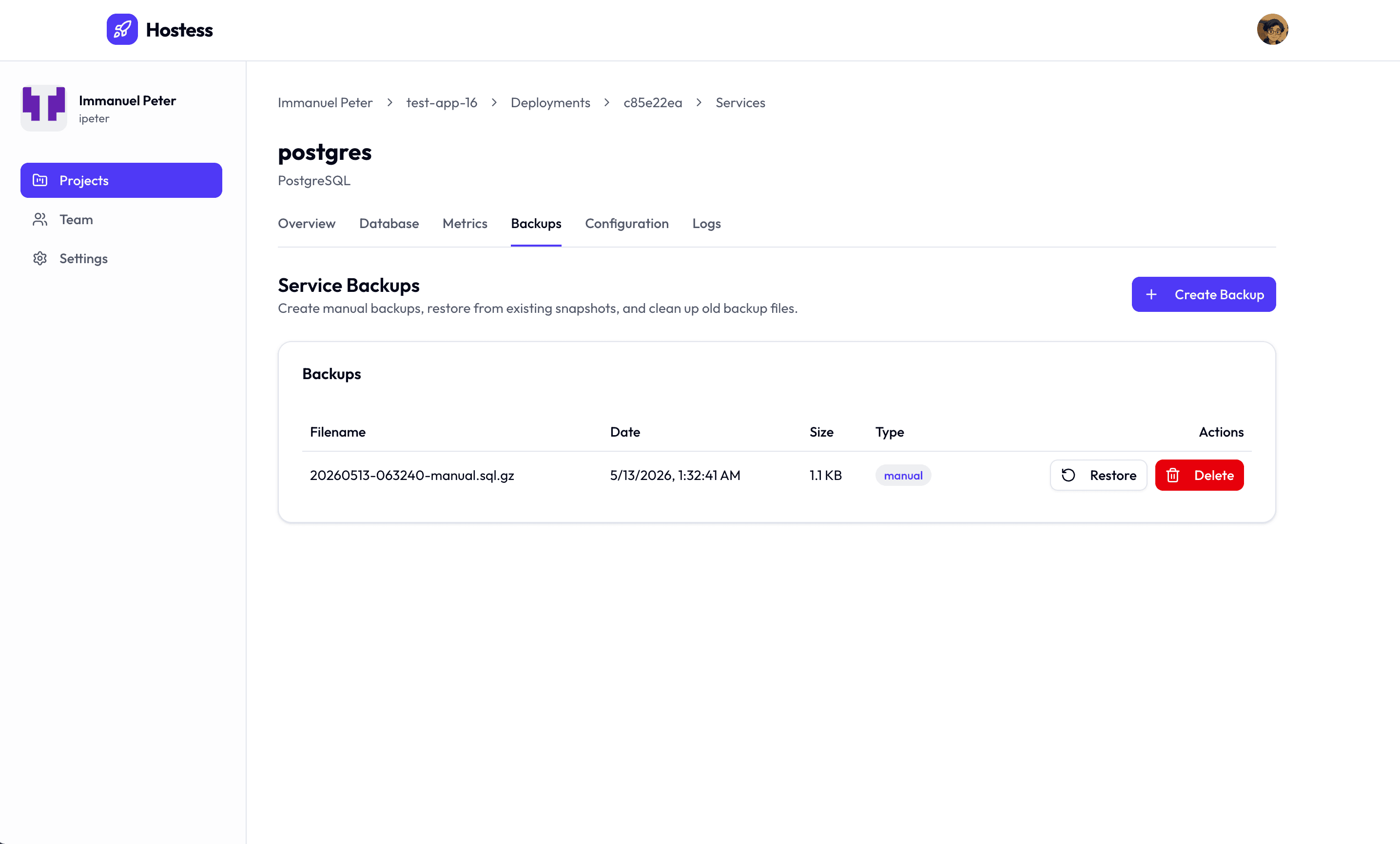
Managing Backups in Studio
You can also view and manage backups from the Hostess Studio dashboard:
- Navigate to your project
- Select the database service
- Click the Backups tab
- View backup history, create manual backups, or initiate restores
Best Practices
Choose the right schedule
| Data Type | Recommended Schedule | Retention |
|---|---|---|
| User data, transactions | daily | 30 |
| Application state | daily | 14 |
| Cache data (Redis) | daily | 7 |
| Analytics databases | weekly | 12 |
| Development/staging | weekly | 4 |
Always enable backups in production
Every production database should have backups enabled. There is no reason to skip backups — the overhead is minimal and the protection is invaluable:
services:
  database:
    type: postgres
    resources: large
    backups:
      schedule: daily
      retention: 14
Test your restores
A backup you have never restored is a backup you cannot trust. Periodically test your restore process:
- Create a preview or staging environment
- Restore a production backup into it
- Verify data integrity
- Confirm your application works with the restored data
Monitor backup sizes
Large or rapidly growing backup sizes may indicate:
- Unbounded table growth (missing data retention policies)
- Large binary data stored in the database (consider object storage instead)
- Unused tables accumulating data