Secrets
Learn how to securely manage environment variables, API keys, and credentials in Hostess using encrypted secrets with environment scoping and .env file syncing.
Overview
Secrets in Hostess are encrypted key-value pairs that store sensitive data like API keys, database credentials, JWT tokens, and third-party service keys. They are encrypted at rest and injected as environment variables into your services at deploy time.
Unlike regular environment variables defined in hostess.yml, secrets never appear in your configuration file or source code. Instead, you reference them using the ${secret:NAME} syntax, and Hostess securely resolves them during deployment.
services:
  api:
    type: fastapi
    env:
      # Regular environment variable — safe to commit
      LOG_LEVEL: info

      # Secret references — values stored securely in Hostess
      JWT_SECRET: ${secret:JWT_SECRET}
      STRIPE_KEY: ${secret:STRIPE_API_KEY}
      SENDGRID_KEY: ${secret:SENDGRID_API_KEY}
If a referenced secret does not exist when you deploy, the deployment will fail with a clear error message telling you which secret is missing.
Creating Secrets
Use the hostess secrets add command to create a new secret:
# Provide the value with the --value flag
hostess secrets add JWT_SECRET --value "my-super-secret-jwt-key"
If you omit the --value flag, Hostess looks for an environment variable with the same name on your local machine:
# This reads the value from $STRIPE_API_KEY in your shell environment
export STRIPE_API_KEY="sk_live_abc123..."
hostess secrets add STRIPE_API_KEY
✓ Secret 'STRIPE_API_KEY' added to productionBy default, secrets are added to all environments in your project. To add a secret to specific environments only, use the --envs flag:
# Add only to production and staging
hostess secrets add STRIPE_KEY --value "sk_live_..." --envs production,staging
Using Secrets in Configuration
Reference secrets in your hostess.yml using the ${secret:NAME} syntax inside the env block of any service:
services:
  api:
    type: fastapi
    build:
      source: ./backend
    env:
      # Database URL comes from magic variables (auto-wired)
      DATABASE_URL: ${database.url}

      # Secrets come from the Hostess secret store
      JWT_SECRET: ${secret:JWT_SECRET}
      STRIPE_KEY: ${secret:STRIPE_API_KEY}
      AWS_ACCESS_KEY: ${secret:AWS_ACCESS_KEY_ID}
      AWS_SECRET_KEY: ${secret:AWS_SECRET_ACCESS_KEY}
Secret references use a colon (:) separator — ${secret:NAME} — while service magic variables use a dot (.) separator — ${service.property}. This distinction makes it clear at a glance where each value comes from.
Environment Scoping
Secrets are scoped to environments. This means you can have different values for the same secret name across production, staging, and preview environments — for example, using a live Stripe key in production and a test key in staging.
Adding to Specific Environments
# Production gets the live key
hostess secrets add STRIPE_KEY --value "sk_live_abc123" --envs production

# Staging and preview get the test key
hostess secrets add STRIPE_KEY --value "sk_test_xyz789" --envs staging,preview
Viewing Environment-Specific Secrets
# View secrets for production only
hostess secrets get --envs production

# View secrets for both staging and production
hostess secrets get --envs staging,production
Comparing Environments
Use hostess secrets diff to see which secrets differ between two environments:
hostess secrets diff production stagingSecret Diff: production vs staging
==================================================
Only in production (1):
- PRODUCTION_CERT = ****
Only in staging (1):
+ DEBUG_KEY = ****
Different values (1):
STRIPE_KEY:
production: ****
staging: ****
Identical (3):
= JWT_SECRET
= SENDGRID_KEY
= AWS_ACCESS_KEY_IDTo see the actual values in the diff output, add --show-values:
hostess secrets diff production staging --show-valuesYou can also output as JSON for scripting:
hostess secrets diff production staging --format jsonSyncing with .env Files
Hostess can sync secrets bidirectionally between a local .env file and your remote Hostess environment. This is useful for setting up a new environment from an existing .env file, or pulling remote secrets into a local development environment.
Push: Local to Remote
Upload all key-value pairs from a local .env file to a remote environment:
# Push from .env (default) to production
hostess secrets sync push --env production

# Push from a specific file
hostess secrets sync push --env production --file .env.production
✓ Synced to production: 5 created, 2 updatedNew secrets are created, and existing secrets with different values are updated automatically.
Pull: Remote to Local
Download all secrets from a remote environment into a local .env file:
# Pull from production to .env (default)
hostess secrets sync pull --env production

# Pull to a specific file
hostess secrets sync pull --env staging --file .env.staging
✓ Pulled 12 secrets from production to .envPulling secrets writes real secret values to a local file. Make sure your .env files are listed in .gitignore to prevent accidentally committing them.
Editing Secrets
To update the value of an existing secret:
hostess secrets edit JWT_SECRET --value "new-rotated-secret-key"Like add, you can scope the edit to specific environments:
hostess secrets edit STRIPE_KEY --value "sk_live_new_key" --envs production✓ Secret 'STRIPE_KEY' updated in productionIf the secret doesn't exist in the specified environment, you'll see a suggestion to use secrets add instead.
After editing a secret, you need to redeploy for the change to take effect. Running hostess deploy will pick up the updated secret value.
Deleting Secrets
To remove a secret from your project:
hostess secrets delete OLD_API_KEYTo delete from specific environments only:
hostess secrets delete TEST_KEY --envs preview,staging✓ Secret 'TEST_KEY' deleted from preview
✓ Secret 'TEST_KEY' deleted from stagingRetrieving Secrets
Use hostess secrets get to list secrets for your project:
# List all secrets (values masked)
hostess secrets get
Environment: production
--------------------------------------------------
KEY | VALUE
-----------------------------
JWT_SECRET | ●●●●●●●●
STRIPE_API_KEY | ●●●●●●●●
SENDGRID_KEY | ●●●●●●●●
Environment: staging
--------------------------------------------------
KEY | VALUE
-----------------------------
JWT_SECRET | ●●●●●●●●
STRIPE_API_KEY | ●●●●●●●●Revealing Values
# Show actual values
hostess secrets get --show-values
Filtering by Name
# Get specific secrets
hostess secrets get JWT_SECRET STRIPE_API_KEY
JSON Output
# Output as JSON (useful for scripts)
hostess secrets get --format json --show-values
Filtering by Environment
# Only show production secrets
hostess secrets get --envs production
Managing Secrets in Studio
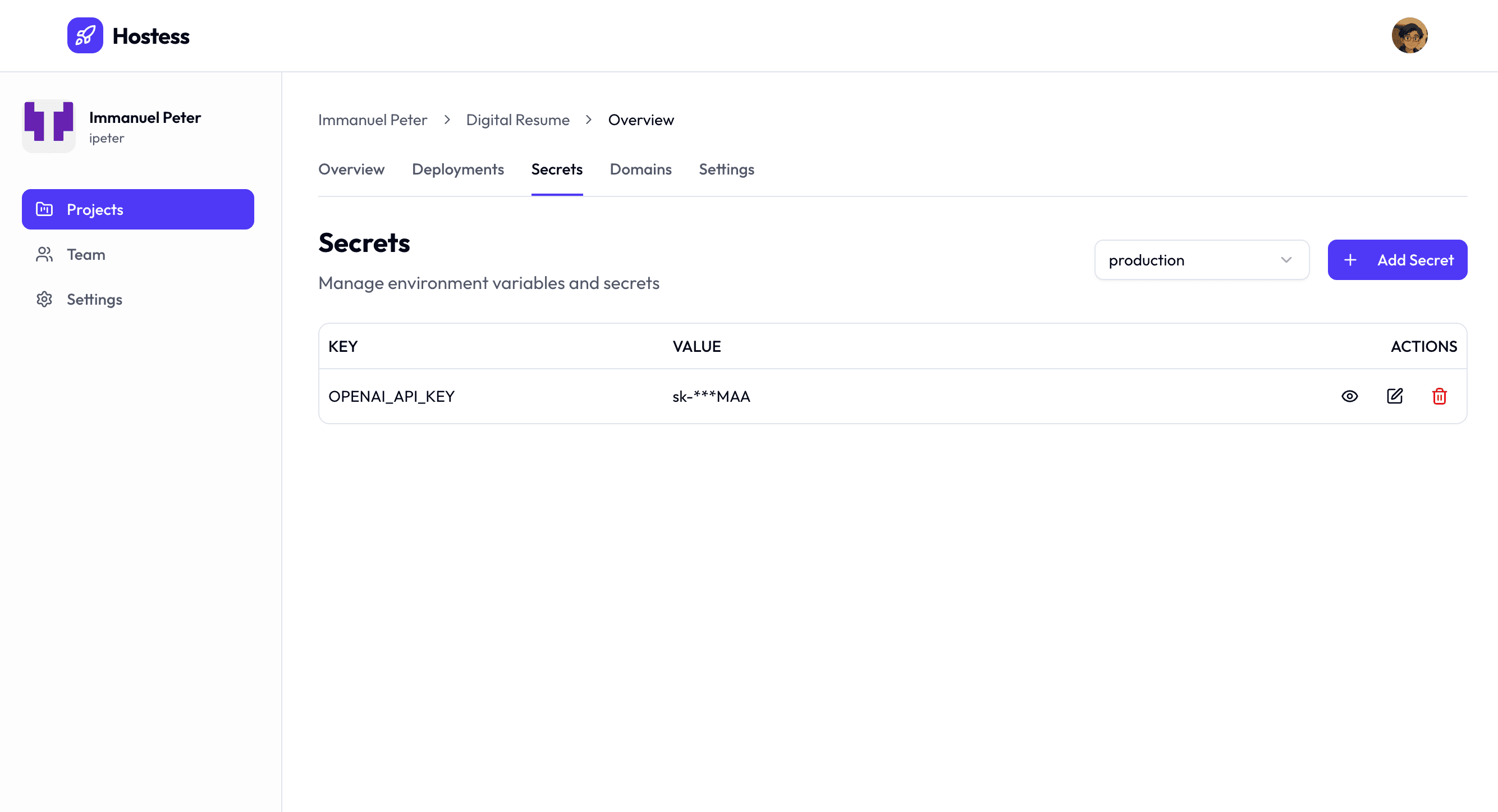
You can also manage secrets through the Hostess Studio web dashboard. The Studio provides a visual interface for viewing, adding, editing, and deleting secrets with masked value display and environment filtering.
Best Practices
Keep your secrets secure. Follow these best practices to protect sensitive data in your Hostess projects.
-
Never commit secrets to source control. Always use
${secret:NAME}references in yourhostess.ymlrather than hardcoding values. Add.envand.env.*to your.gitignore. -
Use environment scoping. Keep production and development secrets separate. Use live API keys only in production, and test keys in staging and preview environments.
-
Rotate secrets regularly. Update API keys and credentials on a regular schedule. Use
hostess secrets editto update a value, then redeploy to pick up the change. -
Use descriptive names. Name your secrets clearly to indicate their purpose:
STRIPE_SECRET_KEY,SENDGRID_API_KEY,JWT_SIGNING_SECRETrather thanKEY1,SECRET,TOKEN. -
Audit with diff. Before deploying to a new environment, run
hostess secrets diffto make sure all required secrets are present and have appropriate values. -
Sync .env files carefully. When using
hostess secrets sync pull, remember that the resulting.envfile contains real secret values. Never share it or commit it.
Quick Reference
| Command | Description |
|---|---|
hostess secrets add <name> | Create a new secret |
hostess secrets edit <name> | Update an existing secret |
hostess secrets delete <name> | Remove a secret |
hostess secrets get [names...] | List or retrieve secrets |
hostess secrets sync push | Upload local .env to remote |
hostess secrets sync pull | Download remote secrets to .env |
hostess secrets diff <env1> <env2> | Compare secrets between environments |
For the full CLI reference with all flags and options, see the secrets CLI reference.