FastAPI
Deploy FastAPI applications with automatic health checks, database migrations, and background workers on Hostess.
Overview
The fastapi service type is designed for FastAPI applications — the modern, high-performance Python web framework. When you set type: fastapi, Hostess configures sensible defaults for port, health checks, and resource allocation tailored to Python web services.
services:
  api:
    type: fastapi
    source: ./backend
That is the simplest possible FastAPI service. Hostess takes care of the rest.
Defaults
When you use type: fastapi, Hostess applies the following defaults:
| Setting | Default Value |
|---|---|
| Port | 8000 |
| Health check | GET /health |
| Resources | medium (1 CPU, 1Gi memory) |
| Replicas | 1 |
You can override any of these in your hostess.yml configuration.
Source
The contract is type: fastapi and source: pointing at your project. Hostess installs application dependencies from the project — pyproject.toml, requirements.txt, or a lockfile — and starts the FastAPI application.
App discovery
Hostess starts the app the way FastAPI discovers it. Set an entrypoint in pyproject.toml:
[tool.fastapi]
entrypoint = "package.module:app"
Or use a layout FastAPI discovers on its own, including a top-level main.py.
Dockerfile
Use build: when you want Hostess to build from your own Dockerfile. You install dependencies and start the server in the image.
Recommended Dockerfile
Here is a production-ready Dockerfile for a typical FastAPI application:
FROM python:3.12-slim

WORKDIR /app

# Install dependencies
COPY requirements.txt .
RUN pip install --no-cache-dir -r requirements.txt

# Copy application code
COPY . .

# Run with Uvicorn
EXPOSE 8000
CMD ["uvicorn", "app.main:app", "--host", "0.0.0.0", "--port", "8000"]
Build Configuration
Your hostess.yml specifies where to find the source code and optionally a custom Dockerfile:
services:
  api:
    type: fastapi
    build:
      source: ./backend
      dockerfile: Dockerfile.prod    # Optional: defaults to "Dockerfile"
      args:                          # Optional: build arguments
        PYTHON_VERSION: "3.12"
Database Migrations
Most FastAPI applications use a database with an ORM (like SQLAlchemy) and a migration tool (like Alembic). Hostess lifecycle hooks can run migrations from the same service image during deployment.
Alembic Migrations
The lifecycle.migrate hook runs your migration command as a standalone deployment task before the application rollout continues. Plan migrations so your current and new application versions can tolerate the migration while it is running.
services:
  api:
    type: fastapi
    source: ./backend
    env:
      DATABASE_URL: ${database.url}
    depends_on:
      - database
    lifecycle:
      migrate:
        command: ["alembic", "upgrade", "head"]
        timeout: 10m

  database:
    type: postgres
    resources: medium
The migration command runs as a standalone deployment task in the same image as your service. Include your migration tool, configuration, and migration files in the project Hostess builds.
Use backward-compatible migrations: add nullable columns before requiring them, deploy code that can read both old and new shapes, and run destructive cleanup after the new version is stable.
Other Migration Tools
The lifecycle.migrate hook works with any migration tool, not just Alembic:
lifecycle:
  migrate:
command: ["aerich", "upgrade"]lifecycle:
migrate:
command: ["python", "scripts/migrate.py"]
timeout: 15mBackground Workers with Celery
Many FastAPI applications use Celery for background task processing. In Hostess, you run Celery workers as a separate custom service that shares the same codebase as your API:
services:
  api:
    type: fastapi
    build:
      source: ./backend
    env:
      DATABASE_URL: ${database.url}
      REDIS_URL: ${cache.url}
      JWT_SECRET: ${secret:JWT_SECRET}
    depends_on:
      - database
      - cache

  worker:
    type: custom
    build:
      source: ./backend
    command: ["celery", "-A", "app.celery", "worker", "--loglevel=info"]
    env:
      DATABASE_URL: ${database.url}
      REDIS_URL: ${cache.url}
    depends_on:
      - database
      - cache
    replicas: 3
    resources: medium
    health:
      command: "celery -A app.celery inspect ping"
      interval: 30s
      timeout: 10s

  beat:
    type: custom
    build:
      source: ./backend
    command: ["celery", "-A", "app.celery", "beat", "--loglevel=info"]
    env:
      DATABASE_URL: ${database.url}
      REDIS_URL: ${cache.url}
    depends_on:
      - database
      - cache
    replicas: 1

  database:
    type: postgres
    resources: medium

  cache:
    type: redis
    resources: small
Key points about this pattern:
- The
workerandbeatservices use the samebuild.sourceas theapiservice, so they can share the same application code and Dockerfile. - Hostess builds each service under its own service name, even when multiple services use the same source directory.
- The
commandfield replaces the imageCMDarguments so the worker starts Celery instead of Uvicorn. - The worker has its own health check using
celery inspect ping. - The beat scheduler should always run as exactly 1 replica to avoid duplicate scheduled tasks.
- Workers can be scaled independently by adjusting
replicas.
Environment Variables
FastAPI applications typically need environment variables for database connections, secret keys, and third-party service configuration:
services:
  api:
    type: fastapi
    source: ./backend
    env:
      # Database and cache connections (magic variables)
      DATABASE_URL: ${database.url}
      REDIS_URL: ${cache.url}

      # Secrets from the Hostess secret store
      JWT_SECRET: ${secret:JWT_SECRET}
      STRIPE_SECRET_KEY: ${secret:STRIPE_SECRET_KEY}
      SENDGRID_API_KEY: ${secret:SENDGRID_API_KEY}

      # Literal values
      LOG_LEVEL: info
      CORS_ORIGINS: ${frontend.external_url}
      ENVIRONMENT: ${deployment.environment}

      # Internal service-to-service URLs
      ML_SERVICE_URL: ${ml-inference.url}

    depends_on:
      - database
      - cache
In your FastAPI application, access these via standard environment variable patterns:
from pydantic_settings import BaseSettings

class Settings(BaseSettings):
    database_url: str
    redis_url: str
    jwt_secret: str
    stripe_secret_key: str
    log_level: str = "info"
    cors_origins: str = ""
    environment: str = "production"

settings = Settings()
API Insights
Every FastAPI service that takes traffic through a public Hostess URL gets request volume, latency, and error-rate charts on its Metrics tab in Studio.
Source services (source:) also get route-level detail and distributed traces with no application code.
Dockerfile services
When you build from a Dockerfile (build:), add the Hostess Python helper for route-level Insights.
Install it:
uv add "hostess-python[fastapi]"Add the dependency to your pyproject.toml so it's included in the image Hostess builds:
[project.dependencies]
"hostess-python[fastapi]>=0.2.0"
Call instrument(app) once, after you create your FastAPI instance:
from fastapi import FastAPI
from hostess_sdk.fastapi import instrument

app = FastAPI()
instrument(app)
The distribution is named hostess-python, but the import package is hostess_sdk.
That's the whole integration. The helper preconfigures OpenTelemetry instrumentation and points it at Hostess automatically — you don't set any OTLP endpoints or environment variables yourself. Hostess injects everything the helper needs at deploy time.
What you get
Once Insights are active and the service is taking traffic, the Metrics tab unlocks:
- Per-route traffic, latency, and status codes — broken down by route template (e.g.
/users/{id}) instead of one aggregate line. - Framework version — the exact FastAPI version the running service reports.
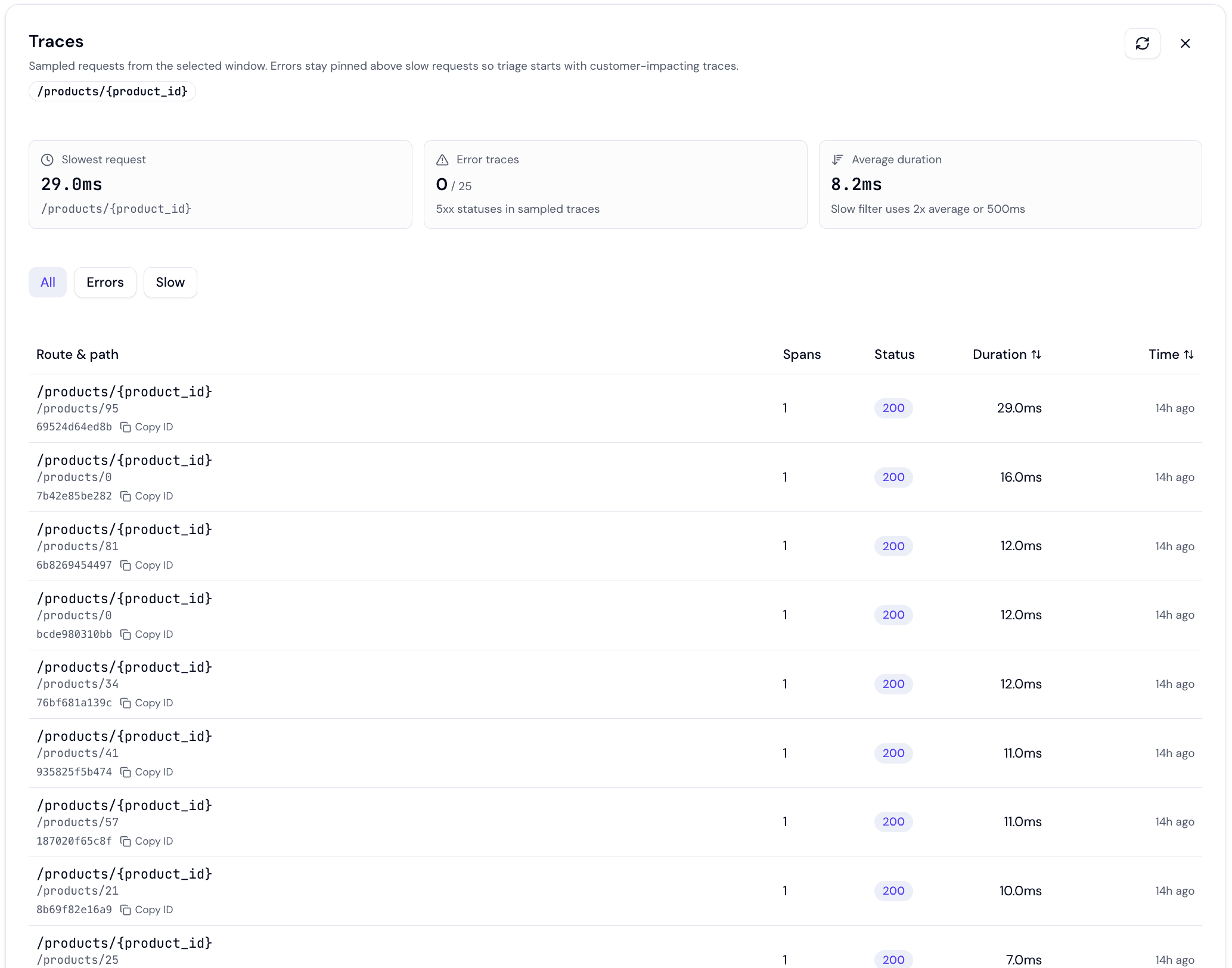
- Distributed traces — click a route to see recent sampled traces, then open one as a waterfall. See Insights → Traces.
Turning it off
Insights are on by default. To disable collection for a service, set insights: disabled or insights.server: disabled:
services:
  api:
    type: fastapi
    source: ./backend
insights: disabledservices:
api:
type: fastapi
source: ./backend
insights:
server: disabledSee the Insights guide for the full picture and the Configuration Reference for the field details.
Health Check Customization
By default, Hostess checks GET /health on port 8000 to determine if your FastAPI application is healthy. You should create this endpoint in your application:
from fastapi import FastAPI

app = FastAPI()

@app.get("/health")
async def health_check():
    return {"status": "ok"}
Custom Health Check Path
If you prefer a different health check endpoint, override it in your configuration:
services:
  api:
    type: fastapi
    source: ./backend
    health:
      http: /api/v1/healthz
      interval: 15s
      timeout: 3s
      retries: 5
Deep Health Checks
For production applications, consider implementing a health check that verifies downstream dependencies:
from fastapi import FastAPI, Response
import asyncpg
import redis.asyncio as redis

app = FastAPI()

@app.get("/health")
async def health_check(response: Response):
    checks = {"api": "ok"}

    # Check database
    try:
        conn = await asyncpg.connect(settings.database_url)
        await conn.fetchval("SELECT 1")
        await conn.close()
        checks["database"] = "ok"
    except Exception:
        checks["database"] = "error"

    # Check Redis
    try:
        r = redis.from_url(settings.redis_url)
        await r.ping()
        await r.close()
        checks["redis"] = "ok"
    except Exception:
        checks["redis"] = "error"

    # Return 503 if any dependency is down
    if any(v == "error" for v in checks.values()):
        response.status_code = 503

    return checks
Be careful with deep health checks. If your health check queries the database and the database is temporarily slow, Hostess may restart your API unnecessarily. Consider using shorter timeouts or a lightweight endpoint for routine health checks.
Custom Ports
By default, FastAPI services listen on port 8000. If your application uses a different port, override it:
services:
  api:
    type: fastapi
    source: ./backend
    ports: [8080]
Hostess starts the FastAPI application on that port. If you use a Dockerfile, make sure the image command listens on the same port:
CMD ["uvicorn", "app.main:app", "--host", "0.0.0.0", "--port", "8080"]Replicas and Autoscaling
For production FastAPI applications, configure multiple replicas or autoscaling:
services:
  api:
    type: fastapi
    source: ./backend
    replicas: 3
    resources: medium
Recommendations
- Development and staging — 1 replica with
smallormediumresources. - Production APIs — Start with
min: 2for redundancy. Two replicas ensure availability during deployments and restarts. - High-traffic APIs — Use autoscaling. FastAPI with Uvicorn handles concurrent requests well, so CPU-based autoscaling is an effective strategy.
- CPU-intensive workloads — If your API does heavy computation (image processing, data analysis), use
largeorxlargeresources and consider more aggressive autoscaling.
Custom Domains
Assign custom domains to your FastAPI service:
services:
  api:
    type: fastapi
    source: ./backend
    domains:
      - api.myapp.com
After deploying, configure DNS for the domain using the target shown by Hostess. See Custom Domains for the full setup guide.
Complete Examples
Minimal FastAPI Application
version: "1.0"

services:
  api:
    type: fastapi
    source: .
FastAPI with Database and Migrations
version: "1.0"
name: my-api

services:
  api:
    type: fastapi
    source: ./backend
    env:
      DATABASE_URL: ${database.url}
      JWT_SECRET: ${secret:JWT_SECRET}
    depends_on:
      - database
    lifecycle:
      migrate:
        command: ["alembic", "upgrade", "head"]
    replicas:
      min: 2
      max: 10
    domains:
      - api.myapp.com

  database:
    type: postgres
    resources:
      preset: large
      storage: 50Gi
    backups: daily
Full-Stack with Workers
version: "1.0"
name: my-platform

services:
  api:
    type: fastapi
    source: ./backend
    env:
      DATABASE_URL: ${database.url}
      REDIS_URL: ${cache.url}
      JWT_SECRET: ${secret:JWT_SECRET}
      STRIPE_KEY: ${secret:STRIPE_KEY}
      FRONTEND_URL: ${frontend.external_url}
    depends_on:
      - database
      - cache
    lifecycle:
      migrate:
        command: ["alembic", "upgrade", "head"]
    replicas:
      min: 2
      max: 10
      target_cpu: 70
    resources: medium
    domains:
      - api.myplatform.com

  worker:
    type: custom
    build:
      source: ./backend
    command: ["celery", "-A", "app.celery", "worker", "--loglevel=info", "--concurrency=4"]
    env:
      DATABASE_URL: ${database.url}
      REDIS_URL: ${cache.url}
    depends_on:
      - database
      - cache
    replicas: 3
    resources: medium
    health:
      command: "celery -A app.celery inspect ping"

  beat:
    type: custom
    build:
      source: ./backend
    command: ["celery", "-A", "app.celery", "beat", "--loglevel=info"]
    env:
      DATABASE_URL: ${database.url}
      REDIS_URL: ${cache.url}
    depends_on:
      - database
      - cache
    replicas: 1

  frontend:
    type: nextjs
    build:
      source: ./frontend
    env:
      API_URL: ${api.url}
    depends_on:
      - api
    domains:
      - myplatform.com
      - www.myplatform.com

  database:
    type: postgres
    resources:
      preset: large
      storage: 100Gi
    backups:
      schedule: daily
      retention: 30

  cache:
    type: redis
    resources: medium